AuxTel Emergency Shutdown
Overview
- Unfavorable circumstances that indicate the need to close the dome if it is open are:
Sunrise approaching in the next two hours.
Power outage affecting the dome shutter mechanism.
Precondition
The dome shutter is open and an unforeseeable condition arises, forcing an emergency dome closure.
Post-Condition
The emergency situation has been clearly notified to the relevant personnel and management.
Steps to eliminate or minimize the risk to the instruments and hardware are being implemented.
Eventually, the dome shutter is closed and all equipment is safe.
Procedure Steps
In the event of an emergency dome closure, the dome shutter won’t be able to be operated from the standard CSC controls. The AuxTel dome would need to be closed either through local override switches or—as a last resort—manually. In case of sudden inclement weather, be very cautious and start closing early.
Warning
If you are dealing with a dome shutter emergency shutdown. Proceed calmly to keep the equipment safe. Please use the standard safety measures when visiting the dome enclosure. Safety of personnel always comes first.
Shutter Closure
Before attempting to close the dome shutter, slew the dome so that it faces west using the
auxtel/atdome/slew_dome.pyscript with the following configuration.auxtel/atdome/slew_dome.py¶az: 270
Note
If the dome cannot slew remotely, continue with the rest of the procedure. Local control of the dome azimuth drives will be located in Step 4.
- Verify if the AuxTel dome shutter can close through CSC control. If unable to close,send ATDome CSC to
Standbybefore continuing the rest of this procedure. Communicate on the #summit-announce channel that the observing crew is going to attempt to close the AuxTel dome via the emergency procedure.
Go up to the AuxTel dome (second floor). Locate the control box at the top of the stairs. The top black button should close the shutter. Press and hold the button to close the dome shutter.
Note
The safety gate at the bottom of the stairs needs to be closed and locked in order for this button to operate.
Slewing ATDome Locally
If slewing the dome remotely was unsuccessful (see Step 1 of procedure), the same control box can rotate the dome using the Clockwise (CW) and Counter-Clockwise (CCW) buttons on the bottom row.
To rotate the dome, press and hold one of the buttons until that the dome shutter faces West (az = 270 deg). If local control does not work, prioritize closing the shutter.
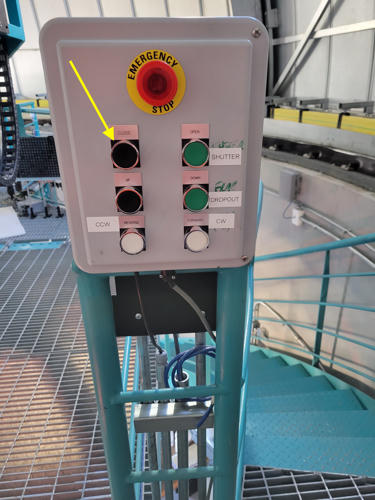
AuxTel Level 2 Control Box
If the above step fails (i.e., no movement after pressing for more than 5 seconds), locate the AuxTel cRIO box. This box rotates with the AuxTel dome and opens/closes the shutter. Attempt to close the shutter by pressing and holding the
CLOSEbutton on the outside of the box (see yellow arrow).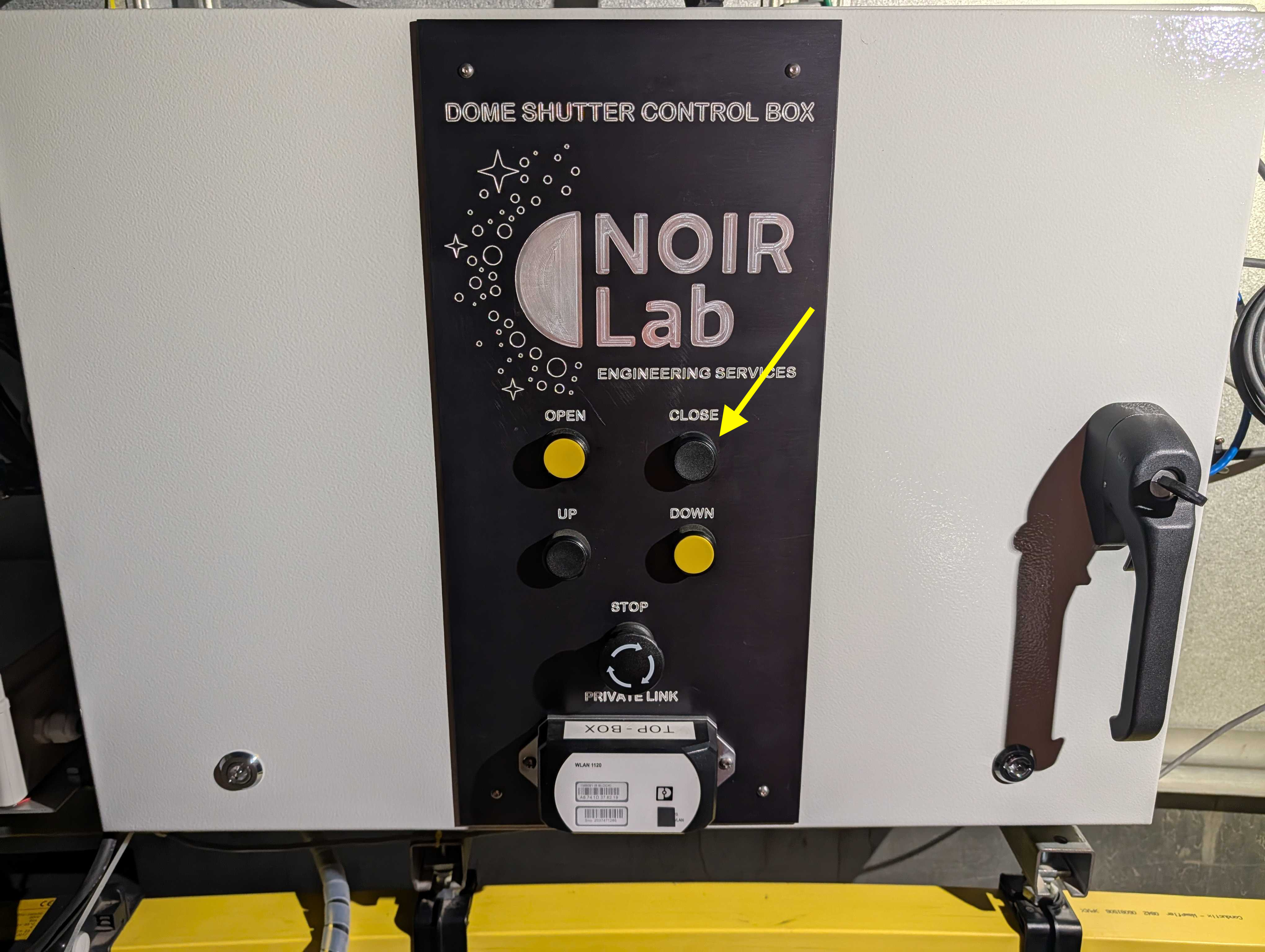
AuxTel Dome Shutter Control Box
If the above step fails (i.e., no movement after pressing for more than 5 seconds), open the box and identify the cRIO switches. Press and hold the white ridges on the switch labeled
CLOSE(see yellow arrow).Execute this step with EXTREME CAUTION!
This is a low-level control switch for the dome. There are no limit switches and no fail-safes.
It is best to stop the shutter movement a few centimeters before it is fully closed. This prevents over-driving of the shutter, which could bang into the lower shutter or cause damage on the drive.
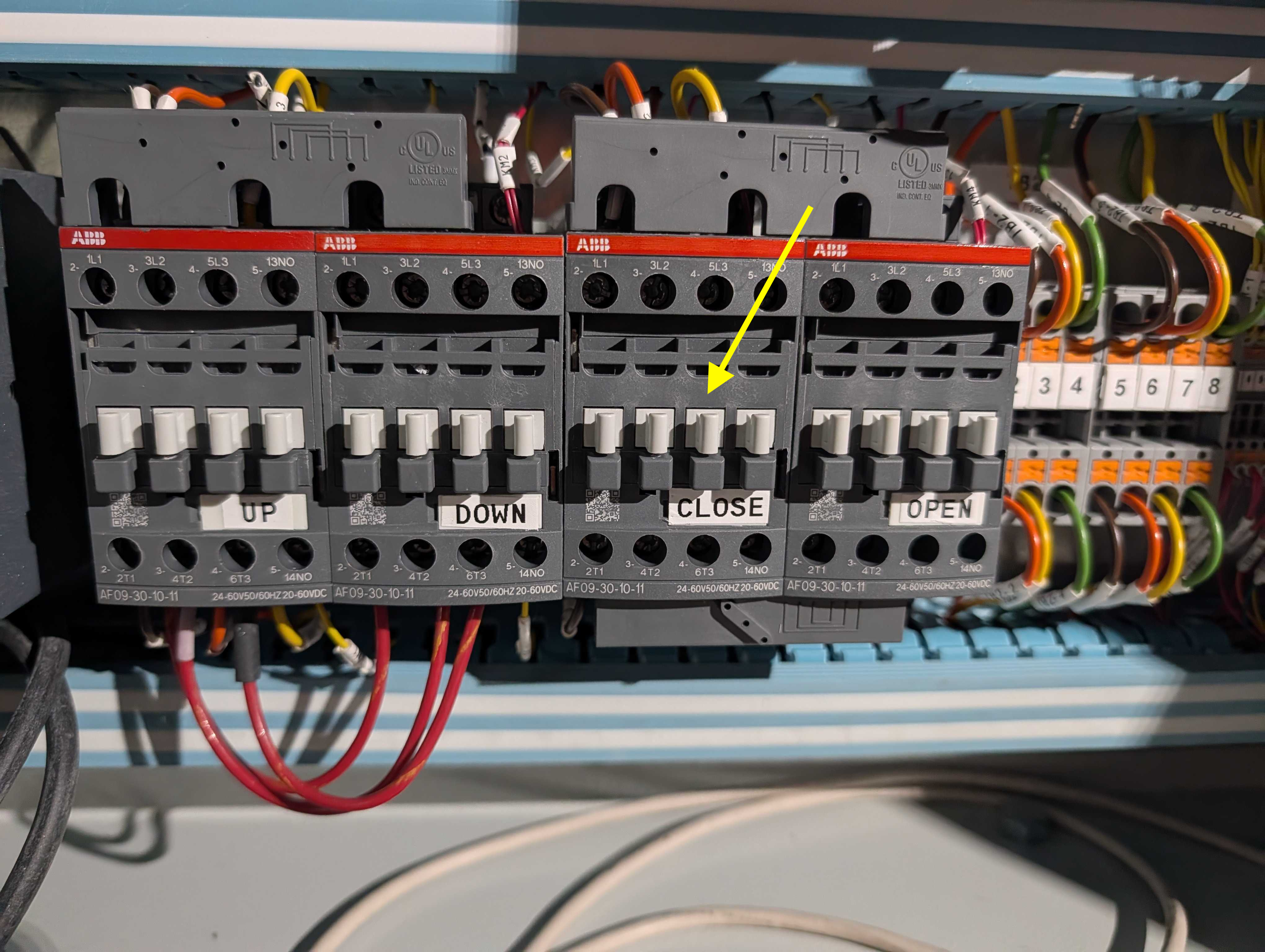
AuxTel cRIO Low-Level Control Switch
If none of these steps were successful, the safest course of action is the leave the dome in its current state and contact AuxTel personnel using the #summit-auxtel Slack channel. They will address the issue the following morning.
(Optional) Manually Closing Shutter
If observers feel comfortable attempting to manually close the shutter by hand, they can follow the steps in Shutter Closure without Power.
Shutter Closure without Power
In the absence of electrical power, the shutter must be closed manually.
On AuxTel first (or sometimes second) floor, there is a hand crank that fits into a ring at the top of the dome.
Note
The crank handle has a removable rotating grip may be loose or detached. To properly use it, secure the handle using a short rigid tool (e.g., one of the nearby Allen keys).
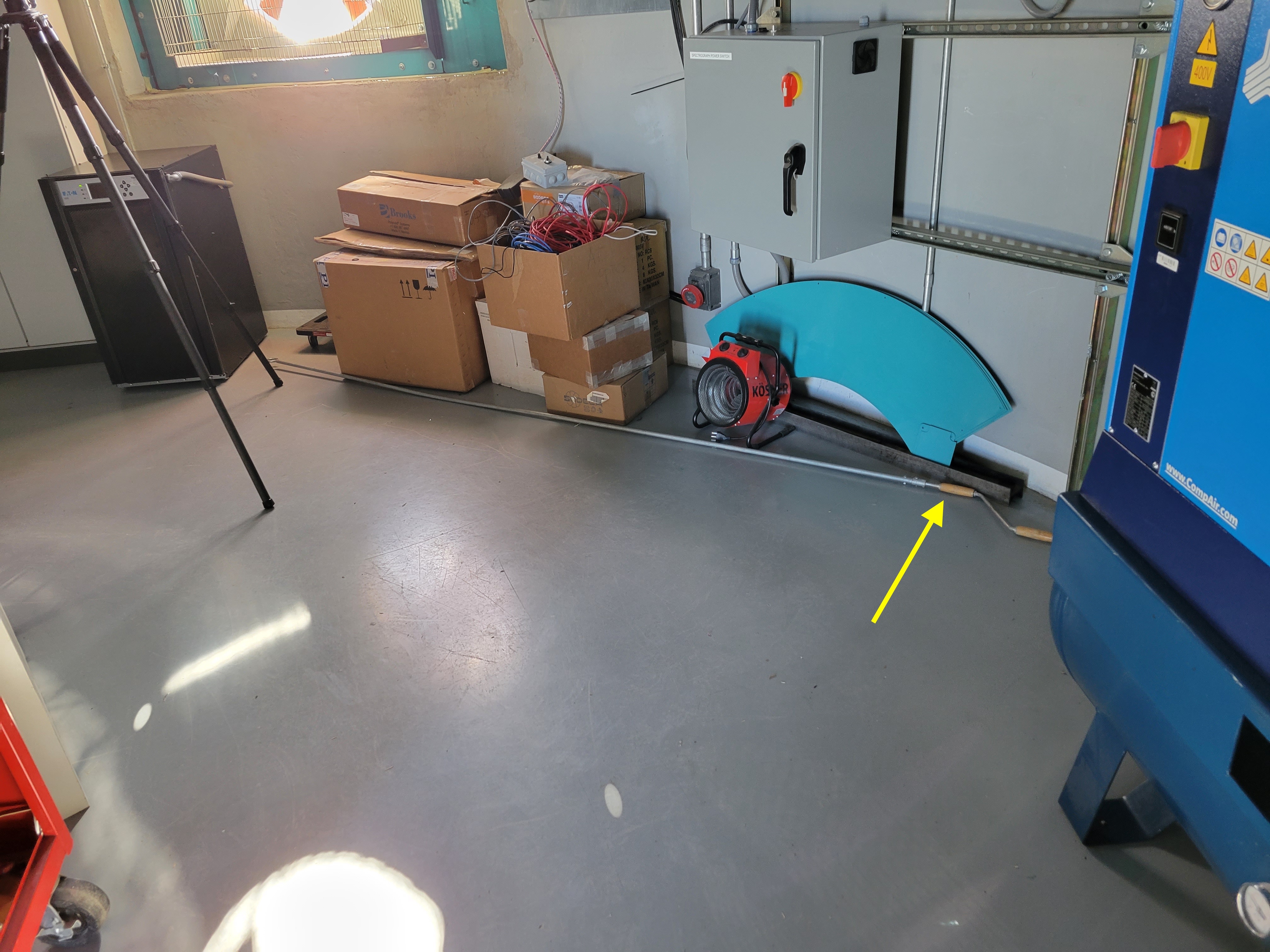
AuxTel Hand Crank
Connect the tip of the crank to the ring at the top of the dome.
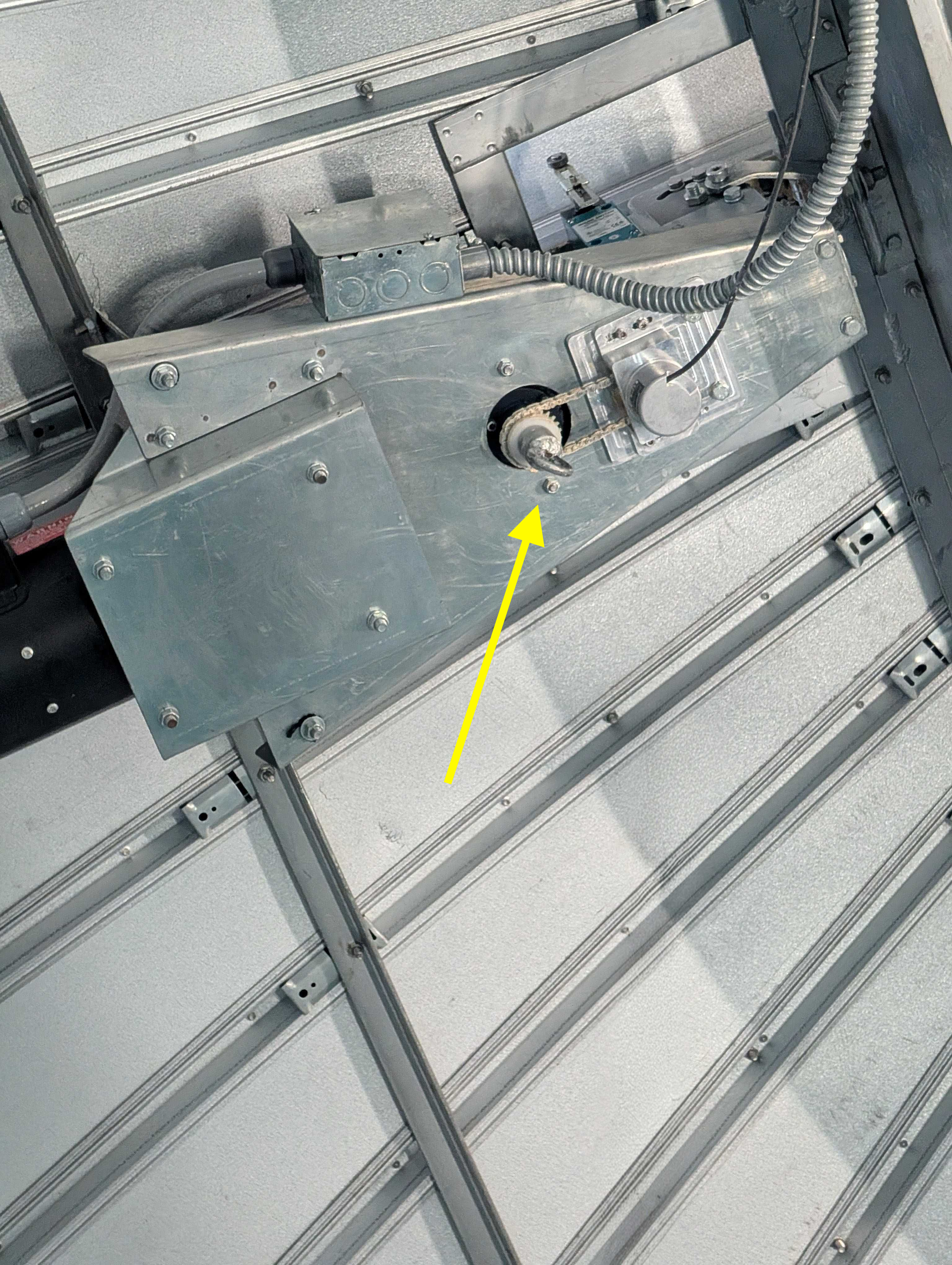
Manual Close Ring (Top of Dome)
Rotate the ring manually with the crank assistance to close the shutter.
Note
This is a long and physically demanding procedure as the hand crank does not have enough torque to lift the weight of the shutter if it is all the way open.
If you cannot safely insert the crank into the drive motor and operate the crank, then remove the crank and do not proceed. Instead, inform AuxTel personnel so they can assist the following morning.
Contingency
If the procedure was not successful, report the issue on the #summit-auxtel channel and/or activate the Out of hours support.
This procedure was last modified Oct 07, 2026.